
To deposit on Pak365 Game you pick a payment method, choose an amount between PKR 100 and PKR 50,000 and confirm the payment in your wallet or bank app. The steps below follow the Deposit screen in the Personal Center.
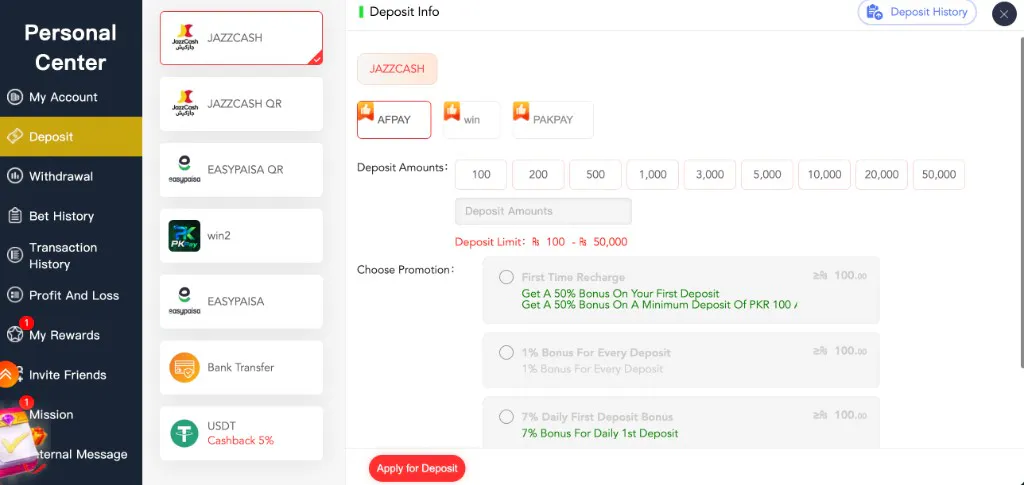
Pak365 Game deposit methods
- JazzCash: pay from your JazzCash mobile account.
- JazzCash QR: scan a QR code with the JazzCash app.
- EasyPaisa: pay from your EasyPaisa mobile account.
- EasyPaisa QR: scan a QR code with the EasyPaisa app.
- Bank Transfer: send money from a bank account.
- USDT: pay in crypto. This method is labelled with 5% cashback.
Some methods offer more than one payment channel. For JazzCash the screen lists AFPAY, win and PAKPAY. If one channel does not go through, try another.
Deposit limits on Pak365 Game
The limit shown on the form is PKR 100 to PKR 50,000 per deposit. Quick buttons cover 100, 200, 500, 1,000, 3,000, 5,000, 10,000, 20,000 and 50,000, or you can type your own amount.
How to deposit on Pak365 Game step by step
- Log in and open the Personal Center.
- Select Deposit from the menu.
- Choose a payment method, for example JazzCash or EasyPaisa.
- Choose a payment channel if more than one is shown.
- Tap an amount, or type one between 100 and 50,000.
- Under Choose Promotion, select a bonus if you want one.
- Tap Apply for Deposit.
- Approve the payment in your wallet or banking app.
- Open Deposit History to confirm that the deposit arrived.
Deposit promotions
- First Time Recharge: a 50% bonus on your first deposit, with a minimum deposit of PKR 100.
- 1% Bonus For Every Deposit.
- 7% Daily First Deposit Bonus: for your first deposit of the day.
The full list is on the Pak365 Game bonuses page.
USDT deposits

Topping up through the USDT channel carries a 5% deposit bonus, according to the promotion banner. You need a crypto wallet that holds USDT to use this method.
If your deposit does not show
- Open Deposit History and check the status of the request.
- Check in your JazzCash, EasyPaisa or bank app that the money left your account.
- Contact support through the Services button in the game and give them the transaction details.
Next steps
When you are ready to cash out, read how to withdraw from Pak365 Game. If you do not have an account yet, start with the Pak365 Game login and register guide.