
You can withdraw from Pak365 Game to an e-wallet or a bank account. Requests are made in the Personal Center, and the Withdrawal screen shows a withdrawal time of 24 hours.
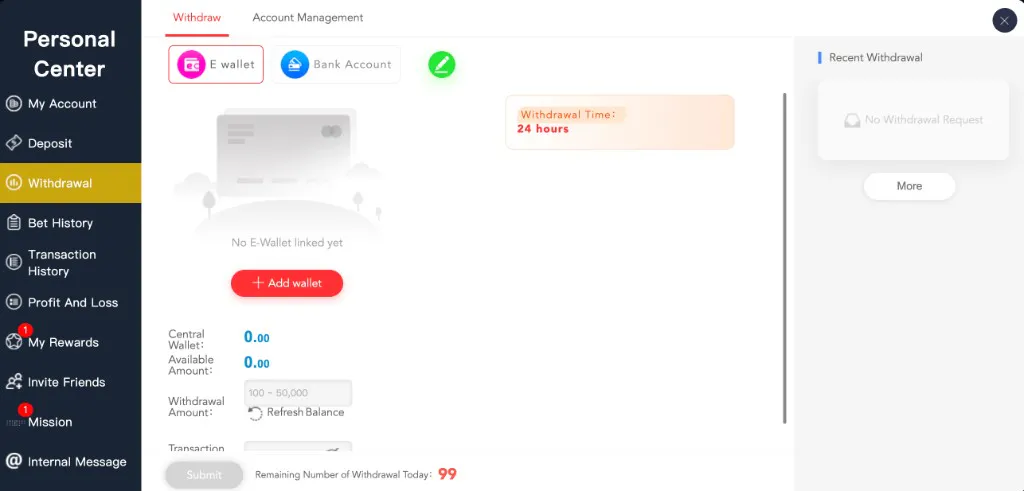
Pak365 Game withdrawal options
- E wallet: a mobile wallet account that you link to your profile.
- Bank Account: a bank account that you link to your profile.
You add these accounts once. They are managed under Account Management, the tab next to Withdraw.
How to withdraw from Pak365 Game step by step
- Log in and open the Personal Center.
- Select Withdrawal from the menu.
- Choose E wallet or Bank Account.
- If nothing is linked yet, tap Add wallet and enter your account details.
- Check the Available Amount.
- Enter a Withdrawal Amount between 100 and 50,000.
- Fill in any remaining fields on the form, such as a transaction password.
- Tap Submit.
Withdrawal time and limits
- Withdrawal time: 24 hours, as shown on the screen.
- Amount per request: the amount field accepts 100 to 50,000.
- Requests per day: the form shows how many withdrawals you have left today.
Central Wallet and Available Amount
The form shows two balances. Central Wallet is your balance in the game. Available Amount is the part you can withdraw now. If the available figure is lower, check the rules of any bonus you claimed, because bonus money often has to be played through before it can be withdrawn.
Track your withdrawal
New requests appear in the Recent Withdrawal panel on the Withdrawal screen. Tap More for older requests, or open Transaction History in the Personal Center.
Related guides
To add balance again, see how to deposit on Pak365 Game. To understand what a bonus requires before you cash out, read about Pak365 Game bonuses.